Triaging tickets
Django uses Trac for managing the work on the code base. Trac is a community-tended garden of the bugs people have found and the features people would like to see added. As in any garden, sometimes there are weeds to be pulled and sometimes there are flowers and vegetables that need picking. We need your help to sort out one from the other, and in the end we all benefit together.
Like all gardens, we can aspire to perfection but in reality there’s no such thing. Even in the most pristine garden there are still snails and insects. In a community garden there are also helpful people who – with the best of intentions – fertilize the weeds and poison the roses. It’s the job of the community as a whole to self-manage, keep the problems to a minimum, and educate those coming into the community so that they can become valuable contributing members.
Similarly, while we aim for Trac to be a perfect representation of the state of Django’s progress, we acknowledge that this simply will not happen. By distributing the load of Trac maintenance to the community, we accept that there will be mistakes. Trac is “mostly accurate”, and we give allowances for the fact that sometimes it will be wrong. That’s okay. We’re perfectionists with deadlines.
We rely on the community to keep participating, keep tickets as accurate as possible, and raise issues for discussion on our mailing lists when there is confusion or disagreement.
Django is a community project, and every contribution helps. We can’t do this without you!
Triage workflow
Unfortunately, not all bug reports and feature requests in the ticket tracker provide all the required details. A number of tickets have patches, but those patches don’t meet all the requirements of a good patch.
One way to help out is to triage tickets that have been created by other users. The core team and several community members work on this regularly, but more help is always appreciated.
Most of the workflow is based around the concept of a ticket’s triage stages. Each stage describes where in its lifetime a given ticket is at any time. Along with a handful of flags, this attribute easily tells us what and who each ticket is waiting on.
Since a picture is worth a thousand words, let’s start there:
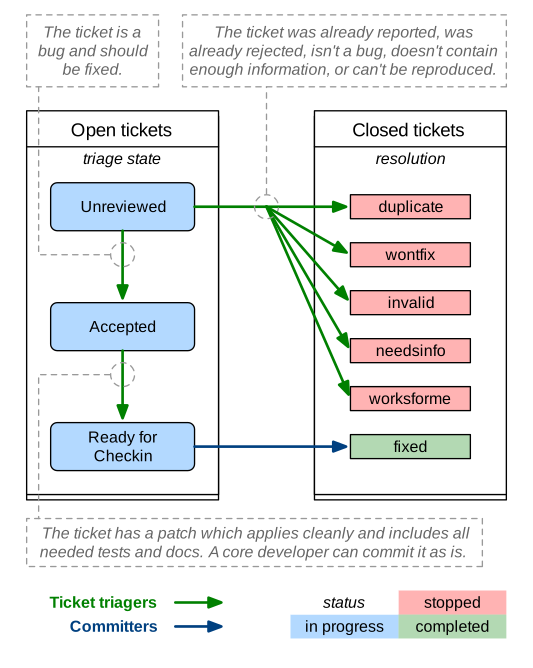
We’ve got two roles in this diagram:
- Committers (also called core developers): people with commit access who are responsible for making decisions and integrating the contributions of the community.
- Ticket triagers: anyone in the Django community who chooses to become involved in Django’s development process. Our Trac installation is intentionally left open to the public, and anyone can triage tickets. Django is a community project, and we encourage triage by the community.
By way of example, here we see the lifecycle of an average ticket:
- Alice creates a ticket, and uploads an incomplete patch (no tests, incorrect implementation).
- Bob reviews the patch, marks it “Accepted”, “needs tests”, and “patch needs improvement”, and leaves a comment telling Alice how the patch could be improved.
- Alice updates the patch, adding tests (but not changing the implementation). She removes the two flags.
- Charlie reviews the patch and resets the “patch needs improvement” flag with another comment about improving the implementation.
- Alice updates the patch, fixing the implementation. She removes the “patch needs improvement” flag.
- Daisy reviews the patch, and marks it RFC.
- Jacob, a core developer, reviews the RFC patch, applies it to his checkout, and commits it.
Some tickets require much less feedback than this, but then again some tickets require much much more.
Triage stages
Below we describe in more detail the various stages that a ticket may flow through during its lifetime.
Unreviewed
The ticket has not been reviewed by anyone who felt qualified to make a judgment about whether the ticket contained a valid issue, a viable feature, or ought to be closed for any of the various reasons.
Accepted
The big gray area! The absolute meaning of “accepted” is that the issue described in the ticket is valid and is in some stage of being worked on. Beyond that there are several considerations:
Accepted + No Flags
The ticket is valid, but no one has submitted a patch for it yet. Often this means you could safely start writing a patch for it. This is generally more true for the case of accepted bugs than accepted features. A ticket for a bug that has been accepted means that the issue has been verified by at least one triager as a legitimate bug - and should probably be fixed if possible. An accepted new feature may only mean that one triager thought the feature would be good to have, but this alone does not represent a consensus view or imply with any certainty that a patch will be accepted for that feature. Seek more feedback before writing an extensive patch if you are in doubt.
Accepted + Has Patch
The ticket is waiting for people to review the supplied patch. This means downloading the patch and trying it out, verifying that it contains tests and docs, running the test suite with the included patch, and leaving feedback on the ticket.
Accepted + Has Patch + Needs …
This means the ticket has been reviewed, and has been found to need further work. “Needs tests” and “Needs documentation” are self-explanatory. “Patch needs improvement” will generally be accompanied by a comment on the ticket explaining what is needed to improve the code.
Ready For Checkin
The ticket was reviewed by any member of the community other than the person who supplied the patch and found to meet all the requirements for a commit-ready patch. A committer now needs to give the patch a final review prior to being committed. See the New contributors’ FAQ for “My ticket has been in RFC forever! What should I do?”
Someday/Maybe
This stage isn’t shown on the diagram. It’s only used by core developers to keep track of high-level ideas or long term feature requests.
These tickets are uncommon and overall less useful since they don’t describe concrete actionable issues. They are enhancement requests that we might consider adding someday to the framework if an excellent patch is submitted. They are not a high priority.
Other triage attributes
A number of flags, appearing as checkboxes in Trac, can be set on a ticket:
Has patch
This means the ticket has an associated patch. These will be reviewed to see if the patch is “good”.
The following three fields (Needs documentation, Needs tests, Patch needs improvement) apply only if a patch has been supplied.
Needs documentation
This flag is used for tickets with patches that need associated documentation. Complete documentation of features is a prerequisite before we can check them into the codebase.
Needs tests
This flags the patch as needing associated unit tests. Again, this is a required part of a valid patch.
Patch needs improvement
This flag means that although the ticket has a patch, it’s not quite ready for checkin. This could mean the patch no longer applies cleanly, there is a flaw in the implementation, or that the code doesn’t meet our standards.
Easy pickings
Tickets that would require small, easy, patches.
Type
Tickets should be categorized by type between:
- New Feature
- For adding something new.
- Bug
- For when an existing thing is broken or not behaving as expected.
- Cleanup/optimization
- For when nothing is broken but something could be made cleaner, better, faster, stronger.
Component
Tickets should be classified into components indicating which area of the Django codebase they belong to. This makes tickets better organized and easier to find.
Severity
The severity attribute is used to identify blockers, that is, issues which should get fixed before releasing the next version of Django. Typically those issues are bugs causing regressions from earlier versions or potentially causing severe data losses. This attribute is quite rarely used and the vast majority of tickets have a severity of “Normal”.
Version
It is possible to use the version attribute to indicate in which version the reported bug was identified.
UI/UX
This flag is used for tickets that relate to User Interface and User Experiences questions. For example, this flag would be appropriate for user-facing features in forms or the admin interface.
Cc
You may add your username or email address to this field to be notified when new contributions are made to the ticket.
Keywords
With this field you may label a ticket with multiple keywords. This can be useful, for example, to group several tickets of a same theme. Keywords can either be comma or space separated. Keyword search finds the keyword string anywhere in the keywords. For example, clicking on a ticket with the keyword “form” will yield similar tickets tagged with keywords containing strings such as “formset”, “modelformset”, and “ManagementForm”.
Closing Tickets
When a ticket has completed its useful lifecycle, it’s time for it to be closed. Closing a ticket is a big responsibility, though. You have to be sure that the issue is really resolved, and you need to keep in mind that the reporter of the ticket may not be happy to have their ticket closed (unless it’s fixed, of course). If you’re not certain about closing a ticket, just leave a comment with your thoughts instead.
If you do close a ticket, you should always make sure of the following:
- Be certain that the issue is resolved.
- Leave a comment explaining the decision to close the ticket.
- If there is a way they can improve the ticket to reopen it, let them know.
- If the ticket is a duplicate, reference the original ticket. Also cross-reference the closed ticket by leaving a comment in the original one – this allows to access more related information about the reported bug or requested feature.
- Be polite. No one likes having their ticket closed. It can be frustrating or even discouraging. The best way to avoid turning people off from contributing to Django is to be polite and friendly and to offer suggestions for how they could improve this ticket and other tickets in the future.
A ticket can be resolved in a number of ways:
- fixed
- Used by the core developers once a patch has been rolled into Django and the issue is fixed.
- invalid
- Used if the ticket is found to be incorrect. This means that the issue in the ticket is actually the result of a user error, or describes a problem with something other than Django, or isn’t a bug report or feature request at all (for example, some new users submit support queries as tickets).
- wontfix
- Used when a core developer decides that this request is not appropriate for consideration in Django. This is usually chosen after discussion in the django-developers mailing list. Feel free to start or join in discussions of “wontfix” tickets on the django-developers mailing list, but please do not reopen tickets closed as “wontfix” by a core developer.
- duplicate
- Used when another ticket covers the same issue. By closing duplicate tickets, we keep all the discussion in one place, which helps everyone.
- worksforme
- Used when the ticket doesn’t contain enough detail to replicate the original bug.
- needsinfo
- Used when the ticket does not contain enough information to replicate the reported issue but is potentially still valid. The ticket should be reopened when more information is supplied.
If you believe that the ticket was closed in error – because you’re still having the issue, or it’s popped up somewhere else, or the triagers have made a mistake – please reopen the ticket and provide further information. Again, please do not reopen tickets that have been marked as “wontfix” by core developers and bring the issue to django-developers instead.
How can I help with triaging?
The triage process is primarily driven by community members. Really, ANYONE can help.
Core developers may provide feedback on issues they’re familiar with, or make decisions on controversial ones, but they aren’t responsible for triaging tickets in general.
To get involved, start by creating an account on Trac. If you have an account but have forgotten your password, you can reset it using the password reset page.
Then, you can help out by:
- Closing “Unreviewed” tickets as “invalid”, “worksforme” or “duplicate.”
- Closing “Unreviewed” tickets as “needsinfo” when the description is too sparse to be actionable, or when they’re feature requests requiring a discussion on django-developers.
- Correcting the “Needs tests”, “Needs documentation”, or “Has patch” flags for tickets where they are incorrectly set.
- Setting the “Easy pickings” flag for tickets that are small and relatively straightforward.
- Set the type of tickets that are still uncategorized.
- Checking that old tickets are still valid. If a ticket hasn’t seen any activity in a long time, it’s possible that the problem has been fixed but the ticket hasn’t yet been closed.
- Identifying trends and themes in the tickets. If there are a lot of bug reports about a particular part of Django, it may indicate we should consider refactoring that part of the code. If a trend is emerging, you should raise it for discussion (referencing the relevant tickets) on django-developers.
- Verify if patches submitted by other users are correct. If they are correct and also contain appropriate documentation and tests then move them to the “Ready for Checkin” stage. If they are not correct then leave a comment to explain why and set the corresponding flags (“Patch needs improvement”, “Needs tests” etc.).
Note
The Reports page contains links to many useful Trac queries, including several that are useful for triaging tickets and reviewing patches as suggested above.
You can also find more Advice for new contributors.
However, we do ask the following of all general community members working in the ticket database:
- Please don’t close tickets as “wontfix.” The core developers will make the final determination of the fate of a ticket, usually after consultation with the community.
- Please don’t promote your own tickets to “Ready for checkin”. You may mark other people’s tickets which you’ve reviewed as “Ready for checkin”, but you should get at minimum one other community member to review a patch that you submit.
- Please don’t reverse a decision that has been made by a core developer. If you disagree with a decision that has been made, please post a message to django-developers.
- If you’re unsure if you should be making a change, don’t make the change but instead leave a comment with your concerns on the ticket, or post a message to django-developers. It’s okay to be unsure, but your input is still valuable.