Tindakan admin
Alir kerja dasar dari admin Django adalah, dalam kulit kacang, "pilih sebuah obyek, kemudian rubah itu." Ini bekerja baik untuk kebanyakan penggunaan kasus. Bagaimanapun, jika anda butuh perubahan sama ke banyak obyek sekali waktu, alir kerja ini bisa sangat membosankan.
In these cases, Django's admin lets you write and register "actions" -- functions that get called with a list of objects selected on the change list page.
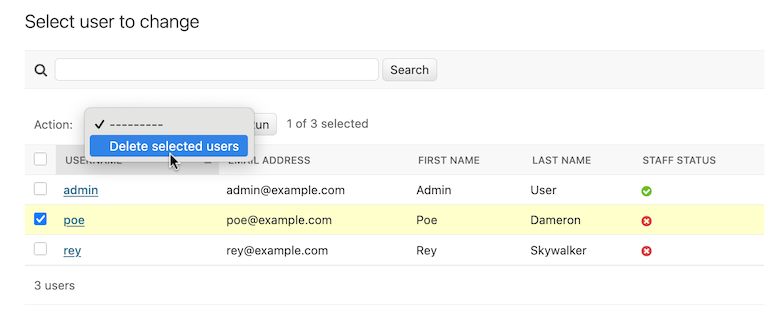
Jika anda mencari daftar perubahan apapun di admin, anda akan melihat fitur ini di tindakan; Django dikirim dengan tindakan "menghapus obyek terpilih" tersedia untuk semua model. Sebagai contoh, ini adalah modul pengguna dari aplikasi django.contrib.auth pasang-tetap Django :
Peringatan
Tindakan "hapus obyek-obyek terpilih" menggunakan QuerySet.delete() untuk alasan efesiensi, yang mempunyai surat keberatan yang penting: metode delete() model anda tidak akan dipanggil.
Jika anda berharap menimpa perilaku ini, anda dapat menimpa ModelAdmin.delete_queryset() atau menulis penyesuaian tindakan yang melakukan penghapusan dalam perilaku anda pilih -- sebagai contoh, dengan memanggil Model.delete() untuk setiap dari barang terpilih.
Untuk latar belakang lebih pada penghapusan jumlah besar, lihat dokumentasi pada object deletion.
Baca untuk menemukan bagaimana menambah tindakan anda sendiri ke daftar ini.
Menulis tindakan
Cara mudah untukmenjelaskan tindakan adalah dengan contoh, jadi mari kita selami.
A common use case for admin actions is the bulk updating of a model. Imagine a
news application with an Article model:
from django.db import models

STATUS_CHOICES = {
    "d": "Draft",
    "p": "Published",
    "w": "Withdrawn",
}


class Article(models.Model):
    title = models.CharField(max_length=100)
    body = models.TextField()
    status = models.CharField(max_length=1, choices=STATUS_CHOICES)

    def __str__(self):
        return self.title
Tugas utama kami mungkin lakukan dengan sebuah model seperti ini adalah memperbaharui sebuah keadaan article dari "draft" menjadi "published". Kami dapat dengan mudah melakukan ini di admin satu artikel pada sekali waktu, tetapi jika kami ingin menerbitkan-jumlah besar kelompok dari artikel, itu akan membosankan. Jadi, mari kita menulis sebuah tindakan yang membuat kita merubah sebuah keadaan artikel menjadi "published."
Menulis fungsi tindakan
First, we'll need to write a function that gets called when the action is triggered from the admin. Action functions are regular functions that take three arguments:
ModelAdminsaat iniSebuah
HttpRequestmewakili permintaan saat ini,Sebuah
QuerySetmengandung sekumpulan dari obyek-obyek terpilih oleh pengguna.
Fungsi terbitan-artikel-ini kami tidak butuh ModelAdmin atau obyek permintaan, tetapi kami akan menggunakan queryset:
def make_published(modeladmin, request, queryset):
    queryset.update(status="p")
Catatan
For the best performance, we're using the queryset's update method. Other types of actions might need to deal with each object individually; in these cases we'd iterate over the queryset:
for obj in queryset:
    do_something_with(obj)
That's actually all there is to writing an action! However, we'll take one
more optional-but-useful step and give the action a "nice" title in the admin.
By default, this action would appear in the action list as "Make published" --
the function name, with underscores replaced by spaces. That's fine, but we
can provide a better, more human-friendly name by using the
action() decorator on the make_published
function:
from django.contrib import admin

...


@admin.action(description="Mark selected stories as published")
def make_published(modeladmin, request, queryset):
    queryset.update(status="p")
Catatan
This might look familiar; the admin's
list_display option uses a similar
technique with the display() decorator to
provide human-readable descriptions for callback functions registered
there, too.
Menambahkan tindakan pada ModelAdmin
Selanjutnya, kami akan butuh menginformasikan ModelAdmin kami dari tindakan. Ini bekerja seperti piliha konfigurasi lain apapun. Jadi, admin.py lengkap dengan tindakan dan pendaftarannya akan terlihat seperti:
from django.contrib import admin
from myapp.models import Article


@admin.action(description="Mark selected stories as published")
def make_published(modeladmin, request, queryset):
    queryset.update(status="p")


class ArticleAdmin(admin.ModelAdmin):
    list_display = ["title", "status"]
    ordering = ["title"]
    actions = [make_published]


admin.site.register(Article, ArticleAdmin)
Kode akan memberikan kami sebuah daftar rubah admin yang terlihat sesuatu seperti ini:
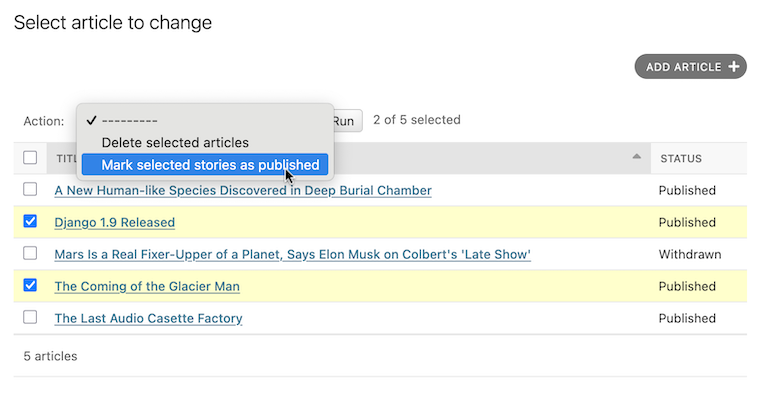
That's really all there is to it! If you're itching to write your own actions, you now know enough to get started. The rest of this document covers more advanced techniques.
Penanganan kesalahan di tindakan
Jika ada kondisi kesalahan mendatang yang mungkin muncul selagi menjalankan tindakan anda, anda harus anggun menginformasikan pengguna dari masalah. Ini berarti menangani pengecualian dan menggunakan django.contrib.admin.ModelAdmin.message_user() untuk memperlihatkan gambaran yang ramah pengguna dari masalah di tanggapan.
Teknik-teknik tindakan lanjutan
Ada sepasang pilihan tambahan dan kemungkinan anda dapat menggunakan lebih pilihan lanjutan
Tindakan sebagai metode ModelAdmin
The example above shows the make_published action defined as a function.
That's perfectly fine, but it's not perfect from a code design point of view:
since the action is tightly coupled to the Article object, it makes sense
to hook the action to the ArticleAdmin object itself.
Anda dapat melakukan itu seperti ini:
class ArticleAdmin(admin.ModelAdmin):
    ...

    actions = ["make_published"]

    @admin.action(description="Mark selected stories as published")
    def make_published(self, request, queryset):
        queryset.update(status="p")
Perhatikan pertama yang kami telah pindahkan make_published kedalam metode dan dinamai kembali parameter modeladmin pada self, dan kedua kami telah sekarang menaruh string 'make_published' dalam actions daripada acuan fungsi langsung. Ini mengatakan ModelAdmin untuk mencari tindakan sebagai sebuah metode.
Defining actions as methods gives the action more idiomatic access to the
ModelAdmin itself, allowing the action to call any of the methods
provided by the admin.
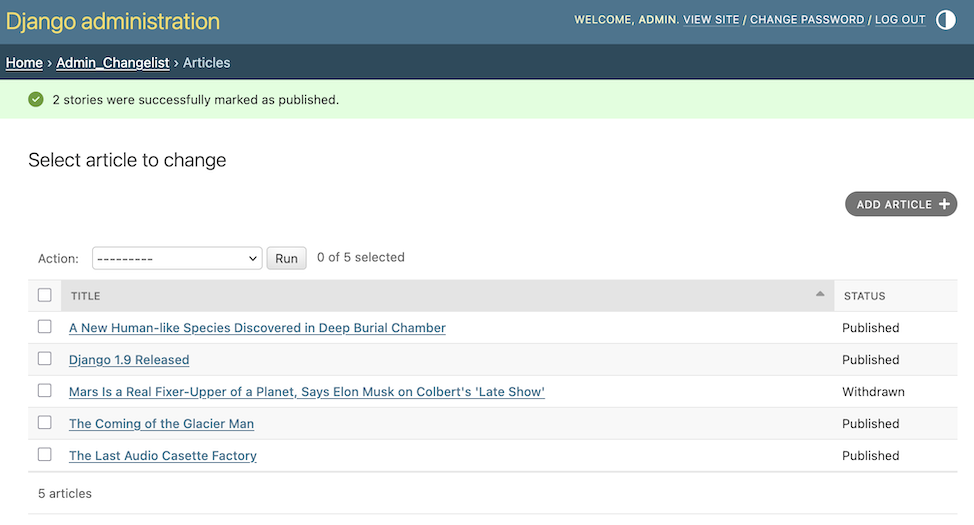
For example, we can use self to flash a message to the user informing them
that the action was successful:
from django.contrib import messages
from django.utils.translation import ngettext


class ArticleAdmin(admin.ModelAdmin):
    ...

    def make_published(self, request, queryset):
        updated = queryset.update(status="p")
        self.message_user(
            request,
            ngettext(
                "%d story was successfully marked as published.",
                "%d stories were successfully marked as published.",
                updated,
            )
            % updated,
            messages.SUCCESS,
        )
This makes the action match what the admin itself does after successfully performing an action:
Tindakan yang menyediakan halaman menengah
By default, after an action is performed the user is redirected back to the original change list page. However, some actions, especially more complex ones, will need to return intermediate pages. For example, the built-in delete action asks for confirmation before deleting the selected objects.
To provide an intermediary page, return an HttpResponse
(or subclass) from your action. For example, you might write an export function
that uses Django's serialization functions to
dump some selected objects as JSON:
from django.core import serializers
from django.http import HttpResponse


def export_as_json(modeladmin, request, queryset):
    response = HttpResponse(content_type="application/json")
    serializers.serialize("json", queryset, stream=response)
    return response
Generally, something like the above isn't considered a great idea. Most of the
time, the best practice will be to return an
HttpResponseRedirect and redirect the user to a view
you've written, passing the list of selected objects in the GET query string.
This allows you to provide complex interaction logic on the intermediary
pages. For example, if you wanted to provide a more complete export function,
you'd want to let the user choose a format, and possibly a list of fields to
include in the export. The best thing to do would be to write a small action
that redirects to your custom export view:
from django.contrib.contenttypes.models import ContentType
from django.http import HttpResponseRedirect


def export_selected_objects(modeladmin, request, queryset):
    selected = queryset.values_list("pk", flat=True)
    ct = ContentType.objects.get_for_model(queryset.model)
    return HttpResponseRedirect(
        "/export/?ct=%s&ids=%s"
        % (
            ct.pk,
            ",".join(str(pk) for pk in selected),
        )
    )
As you can see, the action is rather short; all the complex logic would belong
in your export view. This would need to deal with objects of any type, hence
the business with the ContentType.
Meunlis tampilan ini adalah sisa dari sebuah latihan ke pembaca.
Membuat tindakan tersedia lebar-situs
- AdminSite.add_action(action, name=None)[sumber]
Some actions are best if they're made available to any object in the admin site -- the export action defined above would be a good candidate. You can make an action globally available using
AdminSite.add_action(). For example:from django.contrib import admin admin.site.add_action(export_selected_objects)
This makes the
export_selected_objectsaction globally available as an action named "export_selected_objects". You can explicitly give the action a name -- good if you later want to programmatically remove the action -- by passing a second argument toAdminSite.add_action():admin.site.add_action(export_selected_objects, "export_selected")
Meniadakan tindakan
Terkadang anda butuh meniadakan beberapa tindakan -- khususnya itu registered site-wide -- untuk obyek-obyek tertentu. Ada sedikit cara anda dapat meniadakan tindakan:
Meniadakan tindakan lebar-situs
- AdminSite.disable_action(name)[sumber]
If you need to disable a site-wide action you can call
AdminSite.disable_action().Sebagai contoh, anda dapat menggunakan metode ini memindahkan tindakan "delete selected objects" siap-pakai:
admin.site.disable_action("delete_selected")
Sekali anda telah melakukan diatas, tindakan itu akan tidak lagi tersedia lebar-situs.
If, however, you need to reenable a globally-disabled action for one particular model, list it explicitly in your
ModelAdmin.actionslist:# Globally disable delete selected admin.site.disable_action("delete_selected") # This ModelAdmin will not have delete_selected available class SomeModelAdmin(admin.ModelAdmin): actions = ["some_other_action"] ... # This one will class AnotherModelAdmin(admin.ModelAdmin): actions = ["delete_selected", "a_third_action"] ...
Meniadakan semua tindakan untuk ModelAdmin tertentu
If you want no bulk actions available for a given ModelAdmin, set
ModelAdmin.actions to None:
class MyModelAdmin(admin.ModelAdmin):
    actions = None
Ini memberitahu ModelAdmin untuk tidak memperlihatkan atau mengizinkan tindakan apapun, termasuk site-wide actions apapun.
Tindakan mengadakan dan meniadakan bersyarat
- ModelAdmin.get_actions(request, action_location=ActionLocation.CHANGE_LIST)[sumber]
Akhirnya, anda dapat secara kondisional mengadakan atau meniadakan tindakan-tindakan pada sebuah per-permintaan (dan karenanya berdasarkan per-pengguna) dengan mengutamakan
ModelAdmin.get_actions().This returns a dictionary of actions allowed for the specific
action_location. The keys are action names, and the values areActionobjects.Sebagai contoh, jika anda hanya ingin pengguna yang namanya dimulai dengan 'J' untuk dapat menghapus obyek-pbyek dalam jumlah besar:
class MyModelAdmin(admin.ModelAdmin):
    ...

    def get_actions(self, request, action_location=ActionLocation.CHANGE_LIST):
        actions = super().get_actions(request, action_location=action_location)
        if request.user.username[0].upper() != "J":
            if "delete_selected" in actions:
                del actions["delete_selected"]
        return actions
Changed in Django 6.1:The keyword argument
action_locationwas added. The return type was changed to a dictionary where the keys are action names and the values areActionobjects, previously the values were(function, name, description)tuples.
Pengaturan perizinan untuk tindakan
Actions may limit their availability to users with specific permissions by
wrapping the action function with the action()
decorator and passing the permissions argument:
@admin.action(permissions=["change"])
def make_published(modeladmin, request, queryset):
    queryset.update(status="p")
Tindakan make_published() hanya akan tersedia pada pengguna yang melewatkan pemeriksaan ModelAdmin.has_change_permission().
If permissions has more than one permission, the action will be available
as long as the user passes at least one of the checks.
Available values for permissions and the corresponding method checks are:
'change':ModelAdmin.has_change_permission()'delete':ModelAdmin.has_delete_permission()'view':ModelAdmin.has_view_permission()
Anda dapat menentukan nilai lain apapun selama anda menerapkan metode has__permission(self, request) sesuai pada ModelAdmin.
Sebagai contoh:
from django.contrib import admin
from django.contrib.auth import get_permission_codename


class ArticleAdmin(admin.ModelAdmin):
    actions = ["make_published"]

    @admin.action(permissions=["publish"])
    def make_published(self, request, queryset):
        queryset.update(status="p")

    def has_publish_permission(self, request):
        """Does the user have the publish permission?"""
        opts = self.opts
        codename = get_permission_codename("publish", opts)
        return request.user.has_perm("%s.%s" % (opts.app_label, codename))
Controlling where actions are available
By default, admin actions are available on the change list page only. You can
control where an action appears using the location argument of the
@admin.action decorator.
For example, to make an action available only on the change form, set
location to ActionLocation.CHANGE_FORM:
from django.contrib import admin
from django.contrib.admin import ActionLocation


@admin.action(location=ActionLocation.CHANGE_FORM)
def make_published(modeladmin, request, queryset): ...
To make an action available on both the change list and the change form:
@admin.action(
    location=[ActionLocation.CHANGE_FORM, ActionLocation.CHANGE_LIST],
    description="Publish",
    description_plural="Mark selected stories as published",
)
def make_published(modeladmin, request, queryset): ...
Notice that description and description_plural were provided. These are
optional but the admin action will be labeled by description in the admin
change form and description_plural in the admin change list.
You can customize how actions are rendered by overriding admin templates.
The change list page uses admin/actions.html and the change form page uses
admin/change_form_actions.html. Note that the change form template inherits
from the change list actions template.
The action decorator
- action(*, permissions=None, description=None, description_plural=None, location=ActionLocation.CHANGE_LIST)[sumber]
This decorator can be used for setting specific attributes on custom action functions that can be used with
actions:@admin.action( permissions=["publish"], description="Mark selected stories as published", ) def make_published(self, request, queryset): queryset.update(status="p")
This is equivalent to setting some attributes (with the original, longer names) on the function directly:
def make_published(self, request, queryset):
    queryset.update(status="p")


make_published.allowed_permissions = ["publish"]
make_published.short_description = "Mark selected stories as published"
Use of this decorator is not compulsory to make an action function, but it can be useful to use it without arguments as a marker in your source to identify the purpose of the function:
@admin.action
def make_inactive(self, request, queryset):
    queryset.update(is_active=False)
In this case it will add no attributes to the function.
- Parameter:
permissions -- A list of permission codenames that restrict the action to users who have at least one of the defined permissions. This sets the
allowed_permissionsattribute on the function. See Pengaturan perizinan untuk tindakan for details.description -- A human-readable description of the action to be rendered in the admin. If
descriptionis not provided, Django renders the function's name, converting underscores to spaces and capitalizing the first letter of the first word. This sets theshort_descriptionattribute on the function.description_plural -- A human-readable description of the action used in contexts where plural wording is required, such as on the admin change list. If
description_pluralis not provided, falls back todescription. This sets theplural_descriptionattribute on the function.location -- Specifies where the action is available. Accepts either a single
ActionLocationvalue or an iterable of values. If omitted, the action is only available on the admin change list. See Controlling where actions are available for details.
Action description
%-formatting supportAction descriptions support
%-formatting and may include'%(verbose_name)s'and'%(verbose_name_plural)s'placeholders. These are replaced with the model’sverbose_nameandverbose_name_plural.Changed in Django 6.1:The keyword arguments
description_pluralandlocationwere added.
ActionLocation
- class ActionLocation[sumber]
Enum of allowed values for the
locationparameter of theaction()decorator.- CHANGE_FORM
The action is available on the admin change form. When an action is run, any unsaved changes on the admin change form will be lost.
- CHANGE_LIST
The action is available on the admin change list.
Action
- class Action[sumber]
Represents an action. Actions should be defined using the
action()decorator.- func
The action function. See Menulis fungsi tindakan for details.
- name
The action function name.
- description
A human-readable description of the action to be rendered in the admin.
- plural_description
A human-readable description of the action used in contexts where plural wording is required.
- locations
A list of
ActionLocationvalues the admin action can be rendered.